Are You Experiencing These Symptoms?
If you're seeing any of these issues in your Exchange hybrid environment after October 2025, this post will help you understand and fix the problem:
User-reported symptoms: Free/busy information shows as unavailable when on-premises users try to schedule meetings with Exchange Online users. MailTips don't appear when composing emails to cloud mailboxes. Profile pictures are missing for Exchange Online contacts when viewed from on-premises Outlook clients.
Technical diagnostic: Run this command from Exchange Management Shell to test your OAuth connectivity:
Test-OAuthConnectivity -Service EWS -TargetUri https://outlook.office365.com/ews/exchange.asmx -Mailbox <on-premismailbox@example.com> -Verbose | flIf you see output similar to this, you're experiencing the dedicated hybrid app issue:
Task        : Checking EWS API Call Under Oauth
Detail      : The configuration was last successfully loaded at 01-01-0001 00:00:00 UTC. This was 1065056271 minutes ago

              Exchange Response Details:
              HTTP response message:
              Exception:
              System.Net.WebException: The remote server returned an error: (403) Forbidden.

ResultType  : Error
Identity    : Microsoft.Exchange.Security.OAuth.ValidationResultNodeId
IsValid     : True
ObjectState : New
The key indicators are the 403 Forbidden error and the configuration timestamp showing 01-01-0001, which means your Exchange servers aren't properly configured to use the dedicated hybrid application for authentication.
Administrative context: You may have already run the newest Hybrid Configuration Wizard and consented to the new Entra ID application, but these rich coexistence features remain broken. This suggests you've completed the cloud-side configuration but missed the critical on-premises activation step.
If these symptoms don't match your situation, this particular solution may not apply to your environment. However, if you're seeing 403 Forbidden errors in OAuth connectivity tests along with missing free/busy functionality, read on for the complete explanation and fix.
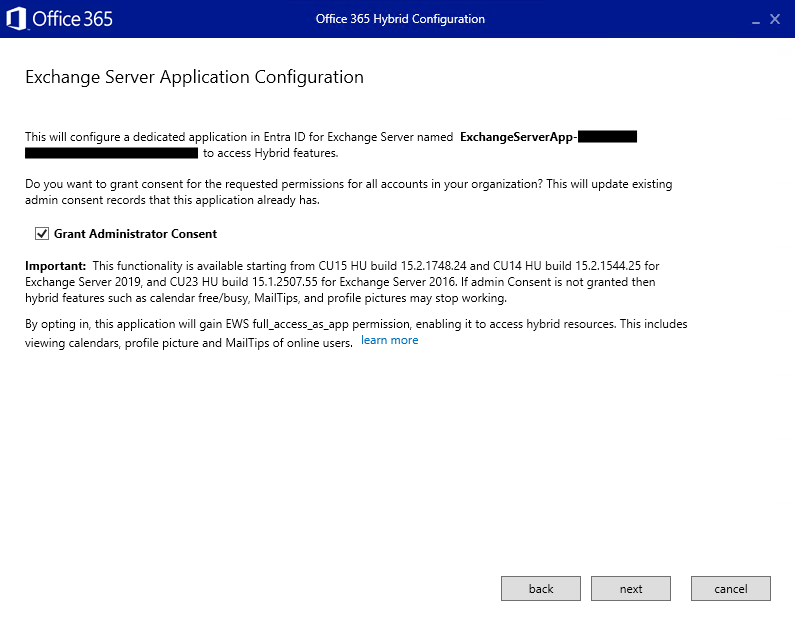
If your Exchange hybrid environment suddenly lost free/busy functionality on mailboxes hosted on Exchange servers after October 2025, you're experiencing Microsoft's forced migration to dedicated hybrid applications. I recently helped a customer who ran the newest Hybrid Configuration Wizard and consented to the new Entra ID application, yet free/busy remained broken. The culprit? The HCW doesn't automatically activate the new Exchange Hybrid App, you need a manual setting override.
What Microsoft Changed
Microsoft replaced the shared service principal that all hybrid customers used with dedicated applications for each organization. This addresses security vulnerabilities like CVE-2025-53786, where attackers could escalate from on-premises Exchange to cloud environments. The change affects three "rich coexistence" features:
- free/busy lookups
- MailTips
- profile picture sharing between on-premises and Exchange Online mailboxes.
Microsoft enforced this transition through temporary blocks that became permanent after October 31, 2025. Organizations that met specific conditions experienced disruptions during September and October 2025 before the final cutoff.
Are You Affected?
You're impacted if all these conditions apply: you have mailboxes both on-premises and in Exchange Online, you use rich coexistence features between environments, your Exchange servers lack dedicated hybrid app support, and the dedicated app wasn't properly enabled.
Required minimum versions with April 2025 HU or later:
- Exchange 2016 CU23: version 15.1.2507.55+
- Exchange 2019 CU14: version 15.2.1544.25+
- Exchange 2019 CU15: version 15.2.1748.24+
- Exchange Subscription Edition: version 15.2.2562.17+
The Missing Step Everyone Gets Wrong
The Hybrid Configuration Wizard creates a dedicated application named "ExchangeServerApp-{your organization GUID}" in Entra ID, handles permissions and certificates, and grants admin consent. However, Microsoft explicitly states that
When the configuration by HCW is done, it does not automatically enable the feature for your on-premises Exchange Server organization.
Your Exchange servers don't know to use the new dedicated application instead of the blocked shared service principal. This requires creating a "Setting Override" - the critical step most administrators miss.
How to Fix It
You have two implementation paths:
Option 1: PowerShell Script
Use Microsoft's ConfigureExchangeHybridApplication.ps1 script, which handles both Entra ID application creation and on-premises activation. The script runs in all-in-one mode or split execution mode and includes cleanup functions for the old shared service principal.
Quick implementation steps:
- Download the script from Microsoft's official link (https://aka.ms/ConfigureExchangeHybridApplication)
- Run it from Exchange Management Shell on a server with April 2025 HU or later
- Execute the command:
.\ConfigureExchangeHybridApplication.ps1 -FullyConfigureExchangeHybridApplication - Follow the prompts for authentication and consent when the script connects to your tenant
This approach is recommended because it handles the complete end-to-end configuration in a single operation, reducing the chance of missing critical steps like the setting override that causes so many implementations to fail.
Option 2: HCW + Manual Override
If you've already run the HCW, create the Setting Override manually using New-SettingOverride in Exchange Management Shell. This tells your Exchange servers to use the dedicated hybrid app.
Quick implementation steps for completing the manual activation:
- Verify the HCW has already created your dedicated Exchange hybrid app in Entra ID (look for "ExchangeServerApp-{your organization GUID}")
- Open Exchange Management Shell on a server with April 2025 HU or later
- Run the setting override command to enable the dedicated hybrid app feature:
New-SettingOverride -Name "EnableExchangeHybrid3PAppFeature" -Component "Global" -Section "ExchangeOnpremAsThirdPartyAppId" -Parameters @("Enabled=true") -Reason "Enable dedicated Exchange hybrid app feature"- Refresh the configuration across your Exchange organization:
Get-ExchangeDiagnosticInfo -Process Microsoft.Exchange.Directory.TopologyService -Component VariantConfiguration -Argument RefreshThe first command creates a configuration override that instructs all Exchange servers in your organization to use the dedicated hybrid application instead of the legacy shared service principal for rich coexistence features. The second command forces an immediate refresh of the configuration settings across your Exchange topology, ensuring the change takes effect without waiting for the normal replication cycle.
This manual approach works well when you prefer to use Microsoft's HCW for the cloud-side configuration but need to complete the on-premises activation that the wizard cannot perform automatically.
Both approaches must run from Exchange Management Shell on a server with April 2025 HU or later. This is a one-time operation per organization.
Microsoft strongly recommends running the script in "Service Principal Clean-Up Mode" to remove vulnerable certificates from the shared service principal, even if you don't need rich coexistence features.
Common Troubleshooting Issues
Admin Consent Problems: The HCW requires tenant-wide admin consent. Without it, you'll get a warning but the app won't function. Re-run HCW or grant consent through the Entra ID portal.
500 Internal Server Errors: These typically indicate certificate issues on Exchange servers rather than Azure configuration problems. Check IIS logs for specific error details.
Multi-geo Issues: Some organizations report free/busy failures for non-NAM regions (GBR, DEU, etc.) while NAM works fine. This appears to be a specific bug.
Validation Steps
After implementation, verify your configuration using
Test-OAuthConnectivity -Service EWS -TargetUri https://outlook.office365.com/ews/exchange.asmx -Mailbox <on-premismailbox@example.com> Remember that successful authentication testing doesn't guarantee working coexistence features - test the actual functionality your users depend on.
Looking Forward
This change prepares your environment for Microsoft's broader EWS retirement in October 2026. The dedicated hybrid app becomes the foundation for migrating to Microsoft Graph APIs in 2025-2026, which offer better security and functionality than legacy EWS.
Organizations completing this transition now avoid last-minute migration complexities and benefit from improved security through isolated authentication and granular permissions. The short-term implementation effort eliminates shared attack surfaces and positions your environment for modern authentication principles.
If you're experiencing broken free/busy functionality, focus on completing the dedicated hybrid app activation immediately. The sooner you finish this transition, the sooner your users regain essential collaborative features for daily productivity.
The key lesson? When Microsoft provides step-by-step guidance through wizards, always verify whether manual configuration steps remain. In this case, the HCW handles cloud configuration perfectly but leaves the critical on-premises activation for administrators to complete manually.