Lately I’ve been spending a lot of time with Microsoft Entra Global Secure Access (GSA) team, and one of the features I’ve been waiting to talk about is finally here in public preview:
🌐 Internet access over remote networks.
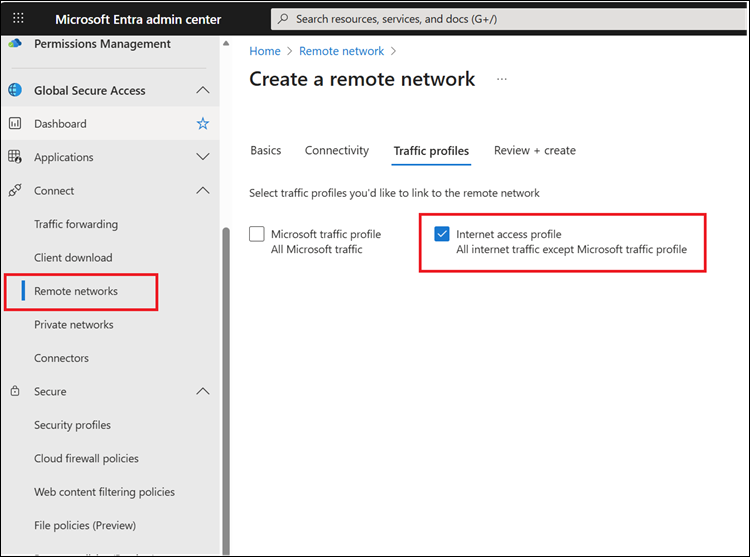
If you’ve been following the evolution of Microsoft’s SSE story, this is a pretty big piece of the puzzle. Until now, securing outbound internet traffic required the GSA Client on user devices. With this preview, you can route traffic from branch offices, IoT devices, guest networks, and even AVD farms all without needing the client installed everywhere.
This opens the door to a bunch of new scenarios that were previously awkward or even impossible to cover cleanly.
Why This Matters
When you choose the Internet traffic profile while creating remote networks, GSA will advertise the entire IPv4 internet route table over BGP to your on-prem equipment.
Your firewalls or routers learn these routes and automatically send internet-bound traffic into GSA over your existing IPsec tunnels.
In practical terms:
If the traffic leaves your branch, it can now be inspected and enforced through Microsoft’s SSE platform, even if the device can’t (or shouldn’t) run the GSA Client.
And that makes a few very real use cases much easier.
Common Use Cases
1. Securing Guest Traffic on Corporate Wi-Fi
Guest Wi-Fi has always been tricky. You want to offer internet access, but you also don’t want personal devices wandering into corporate resources.
With remote-network-based internet enforcement, you can:
- Keep guest traffic separate
- Prevent access to unwanted or unauthorized sites
- Avoid requiring guest devices to install anything
It’s a simple way to harden a space that’s normally a bit of a playground.
2. Protecting Printers, Sensors, and Other IoT Devices
This one’s surprisingly important. Many enterprises have printers, scanners, sensors, and micro-controllers living in their branch offices. These devices:
- Can’t run the GSA Client
- Often can’t store certificates
- Still need controlled access to the internet (firmware updates, telemetry, etc.)
Routing their traffic through GSA means you decide exactly which destinations they can reach nothing more, nothing less.
3. Leveraging Existing On-Prem Infrastructure
Some organizations have:
- Heavy investments in on-prem firewalls
- Regulatory requirements to keep visibility on internet-bound traffic
- A desire to make sure “nothing leaves the WAN without going through us first”
Remote networks let you keep that architecture intact while still using cloud-based security enforcement.
Everything flows through your equipment, then out through GSA. Best of both worlds.
4. Azure Virtual Desktop Farms
Multi-session AVD hosts usually serve multiple shift workers across the day. Installing and maintaining the GSA Client on each session host can get messy.
With remote networks, you can:
- Apply consistent security policies across all session hosts
- Avoid client deployment overhead
- Keep the environment clean, stable, and centrally controlled
How the Routing Works (in Plain Language)
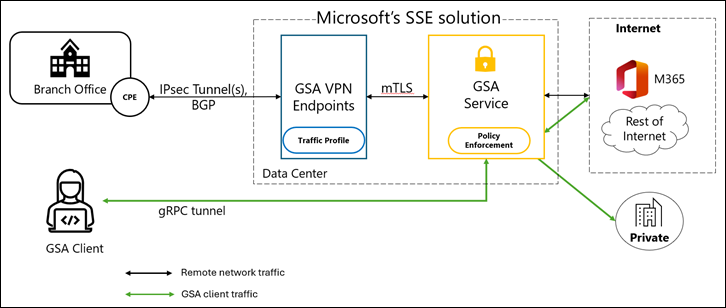
When you choose the Internet profile, GSA advertises all internet IPv4 routes to your branch routers/firewalls via BGP.
They respond by sending all internet-bound traffic through the IPsec tunnel to GSA VPN endpoints, where policy enforcement happens.
It’s a clean design:
- Branch → IPsec → GSA VPN endpoints
- GSA → Policy enforcement → Internet
- Return traffic back through the same path
And because it’s BGP-based, the routing is dynamic, stable, and scalable.
Want to Try It?
Microsoft’s documentation walks through setting up remote networks, selecting traffic profiles, and configuring BGP:
👉 Official docs: https://learn.microsoft.com/en-us/entra/global-secure-access/how-to-create-remote-networks?tabs=microsoft-entra-admin-center
If you're running distributed offices, guest networks, or any kind of “can’t-install-the-client” devices, this preview is absolutely worth exploring.