Group Cross-Tenant Synchronization in Microsoft Entra ID - Now in Public preview!
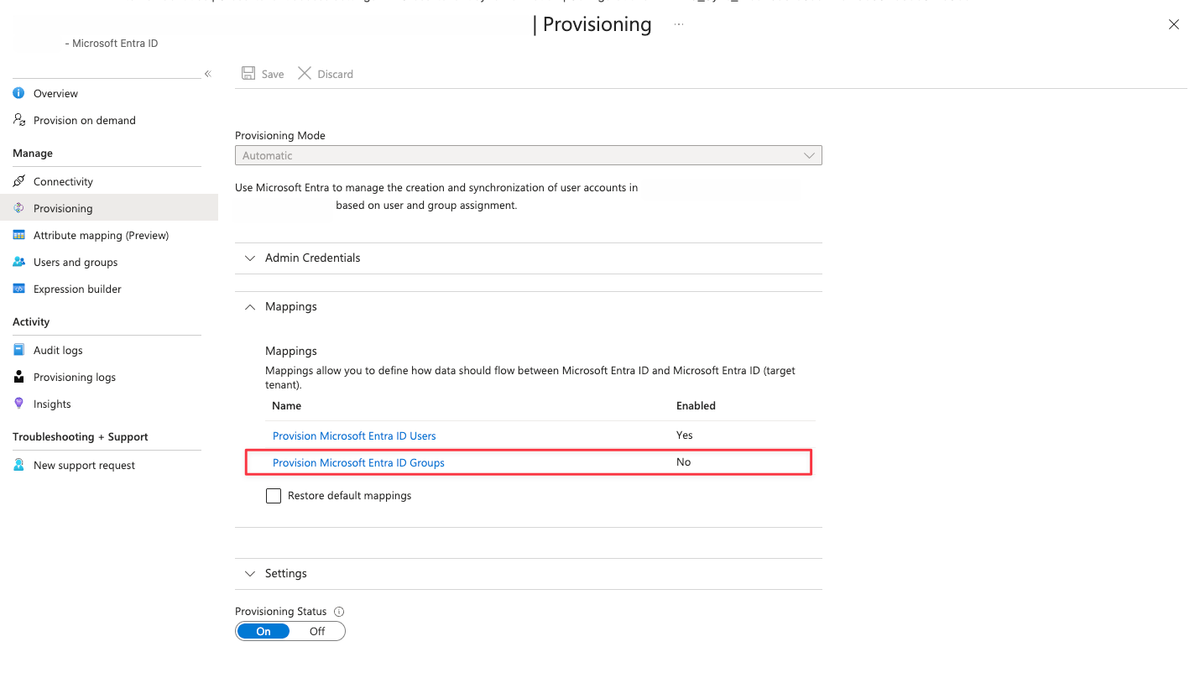
Microsoft Entra cross-tenant synchronization has already proven useful for managing external users across tenants. With the introduction of group cross-tenant synchronization, the model becomes significantly more practical for real-world enterprise scenarios where access is driven by security groups rather than individual users.
I have been waiting for this capability because user-only synchronization often leaves a gap between identity lifecycle management and access governance. This new feature starts to close that gap.
What’s New
Until now, cross-tenant synchronization focused exclusively on users. The new public preview extends this capability to security groups, allowing groups from a source tenant to be synchronized into a target tenant.
When enabled, Entra ID can now:
- Create security groups in the target tenant
- Keep group memberships continuously in sync
- Manage external user objects in the target tenant as group members
This makes it possible to drive access, conditional access, and entitlement assignments in the target tenant using groups mastered in another tenant.
In most environments, access is not assigned user by user. It is assigned through groups that reflect roles, teams, or business functions. Without group synchronization, administrators had to rebuild this logic manually in each tenant.
With group cross-tenant synchronization:
- The source tenant remains authoritative
- Access in the target tenant becomes predictable and auditable
- Identity governance scenarios scale much better across tenant boundaries
This is especially relevant for organizations operating multiple Entra tenants within the same corporate structure.
Prerequisites and Permissions
There are a few important prerequisites to be aware of.
Licensing
- the feature require Microsoft Entra ID Governance or Entra Suite
Required Roles
- Target tenant: Security Administrator
- Source tenant:
- Hybrid Identity Administrator (for synchronization)
- Security Administrator (for cross-tenant access policies)
The source tenant must be explicitly enabled for group synchronization. Once enabled, groups appear as a configurable object type in the provisioning configuration.
How Group Cross-Tenant Sync Works
When group sync is enabled:
- Security groups are created in the target tenant
- Membership changes in the source tenant are reflected automatically
- Members appear as external users in the target tenant
- The target tenant does not override group changes unless they originate from the source tenant
This design prevents accidental takeover of sensitive groups and keeps ownership clear.
Setup Guide for Group Cross-Tenant Sync
Microsoft has well-written documentation on configuring Group sync. Take a look at it here:
 kenwith
Limitations of Group Synchronization with Cross-Tenant Sync
While group synchronization with cross-tenant sync is a welcome addition, there are a few important limitations to be aware of before you start planning your deployment:
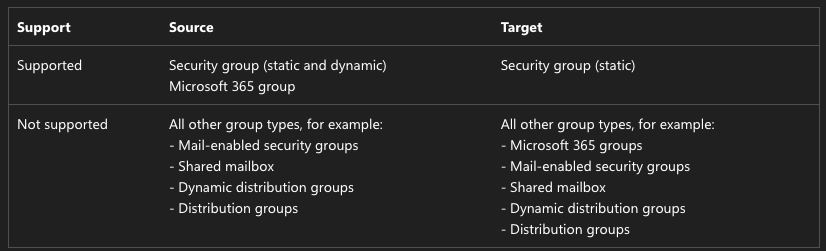
- Security groups only: Cross-tenant sync will not create Microsoft 365 groups, distribution groups, mail-enabled security groups, or distribution lists. So if you were hoping to sync your M365 Groups or DLs across tenants, you're still out of luck.
- No nested group support: Nested groups are not supported. If your source tenant relies heavily on nested group structures, you'll need to flatten those out or rethink your approach.
- Scope must be explicit: The synchronization scope must be set to "Sync only assigned users and groups." The "Sync all users" option is not supported when group synchronization is enabled. This means you need to deliberately assign the groups you want synced to the configuration — there's no "sync everything" shortcut here.
- No cross-cloud support for groups: Synchronizing groups across cloud environments (Azure Commercial, Azure Government, Azure operated by 21Vianet) isn't supported.
- Licensing: Group sync requires a Microsoft Entra ID Governance or Microsoft Entra Suite license, which is a step up from the P1/P2 license required for user sync. Make sure that's factored into your cost planning.
- Members don't automatically follow: When a group is synced, the group object itself lands in the target tenant, but whether the members of that group also sync depends on whether those users are already in scope for synchronization. You still need your user sync to be properly configured alongside group sync.