Starting on or after October 15, 2024, to further increase security, Microsoft will require admins to use multi-factor authentication (MFA) when signing into the Microsoft Azure portal, Microsoft Entra admin center, and Microsoft Intune admin center.
Note: This requirement will also apply to any services accessed through the Intune admin center, such as Windows 365 Cloud PC. To take advantage of the extra layer of protection MFA offers, I recommend enabling MFA as soon as possible 😉
So how will this affect you?🧐
MFA will need to be enabled for your tenant to ensure admins are able to sign-in to the Azure portal, Microsoft Entra admin center and Intune admin center after this change.
What you need to do to prepare:
- If you have not already, set up MFA before October 15, 2024, to ensure your admins can access the Azure portal, Microsoft Entra admin center, and Intune admin center.
- If you are unable to set up MFA before this date, you can apply to postpone the enforcement date.
- If MFA has not been set up before the enforcement starts, admins will be prompted to register for MFA before they can access the Azure portal, Microsoft Entra admin center, or Intune admin center on their next sign-in.
Prepare for multifactor authentication
All users who access the admin portals and Azure clients listed in applications must be set up to use MFA. All users who access any administration portal should use MFA.
- Learn about Microsoft Entra multifactor authentication and the different authentication methods available for use.
- Enable users for one or more MFA methods
- Prefer more secure phishing-resistant MFA methods
- If you don’t require MFA in your tenant today, there are several options available to set it up (listed in preferred order):
- Use Conditional Access policies (in report-only mode to start) targeting:
- All users
- While in report-only mode, don't configure exceptions. This configuration more closely mirrors the enforcement pattern of Microsoft Entra MFA program.
- Microsoft administration portals (includes portals in scope for this Microsoft Entra MFA enforcement)
- Require multifactor authentication or if you want more granular control, use authentication strengths
- All users
- Enable Security defaults
- Use Conditional Access policies (in report-only mode to start) targeting:
- Review information to help configure and deploy MFA:
Export list of users
You can export the list of users that have signed into the Azure portal, Azure CLI, or Azure PowerShell over the last 30 days by querying the sign-in logs.
The report also includes each user's multi-factor authentication (MFA) registration status from Microsoft Entra.
Permissions and roles
- Required Microsoft Entra role: Global Reader
- Required permission scopes: Directory.Read.All, AuditLog.Read.All, UserAuthenticationMethod.Read.All
Install-Module MsIdentityTools -Scope CurrentUser

Connect-MgGraph -Scopes Directory.Read.All, AuditLog.Read.All, UserAuthenticationMethod.Read.All

Export-MsIdAzureMfaReport .\report.xlsx
the report should look something like this:
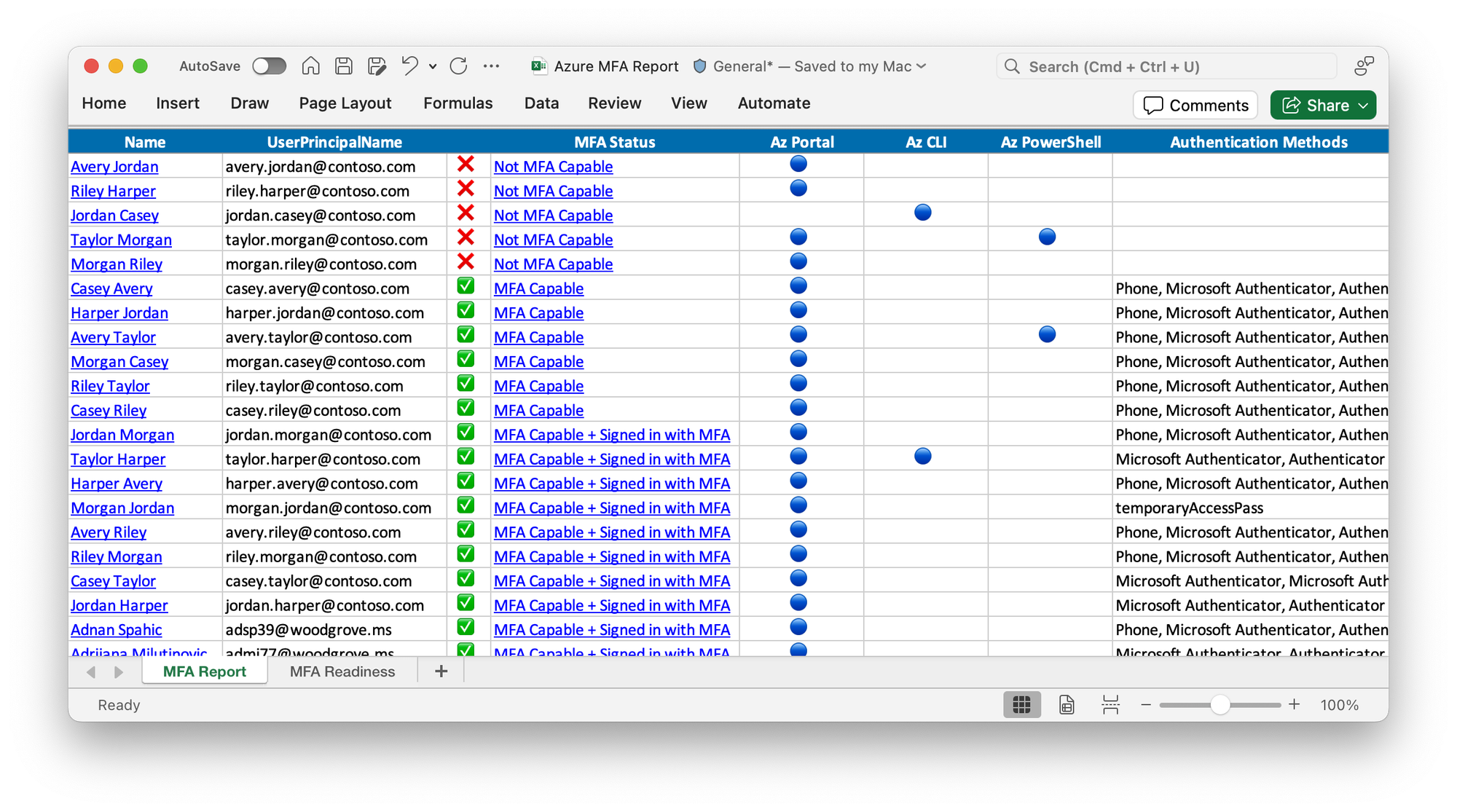
Status symbol meaning
- ✅ MFA Capable + Signed in with MFA: The user has MFA authentication methods registered and has successfully signed in at least once to Azure using MFA.
- ✅ MFA Capable: The user has MFA authentication methods registered but has always signed into Azure using single factor authentication.
- ❌ Not MFA Capable: The user has not yet registered a multi-factor authentication method and has not signed into Azure using MFA. Note: This status may not be accurate if your tenant uses identity federation or a third-party multi-factor authentication provider. See MFA Status when using identity federation.
Request more time to prepare for enforcement
Microsoft allows grace periods for customers with complex environments or technical barriers.
Between 15/08/2024 and 15/10/2024, Global Administrators can go to the Azure portal to postpone the start date of enforcement for their tenant to 15/03/2025. Global Administrators must have elevated access before postponing the start date of MFA enforcement on this page.
Global Administrators must perform this action for every tenant for which they would like to postpone the start date of enforcement.
By postponing the start date of enforcement, you take extra risk because accounts that access Microsoft services like the Azure portal are highly valuable targets for threat actors.