Discover Identities in Target Applications with Account Discovery in Microsoft Entra ID
Introduction
If you work with SCIM provisioning in Microsoft Entra ID, you probably know the feeling. You configure provisioning for an enterprise application, you set up your attribute mappings, you assign users and groups, and you hit "Start provisioning." Everything looks good from the Entra side. But the target application already had accounts in it before you connected anything. Some of those accounts belong to active employees, some are leftovers from people who left the company years ago, and some are service accounts that nobody remembers creating. Until now, there was no clean way to get an overview of what actually exists on the other side.
That is exactly what Account Discovery solves. It is currently in public preview under Microsoft Entra ID Governance, and it gives you a way to pull all user accounts from a target application and classify them against your directory. Think of it as a reconciliation tool between what Entra ID knows about and what actually lives in the application.
Understanding the Need for Account Discovery
When you set up SCIM-based provisioning to an enterprise application, the provisioning service only manages accounts going forward. It creates new accounts for assigned users, updates attributes on sync cycles, and deprovisions when someone is unassigned. But it does not tell you about the accounts that were already there before provisioning was turned on. It also does not flag accounts that were created directly in the application by a local admin after provisioning was configured.
This is a real problem for organizations that care about identity governance. You might have a Salesforce instance with hundreds of user accounts, and only a fraction of them are matched to Entra ID users through provisioning. The rest are invisible to your governance processes. No access reviews cover them. No lifecycle workflows touch them. They just exist.
Account Discovery changes this by importing all accounts from the target application using the SCIM protocol and then matching them against your Entra ID directory. The result is a categorized view that tells you exactly where you stand.
How the Classification Works
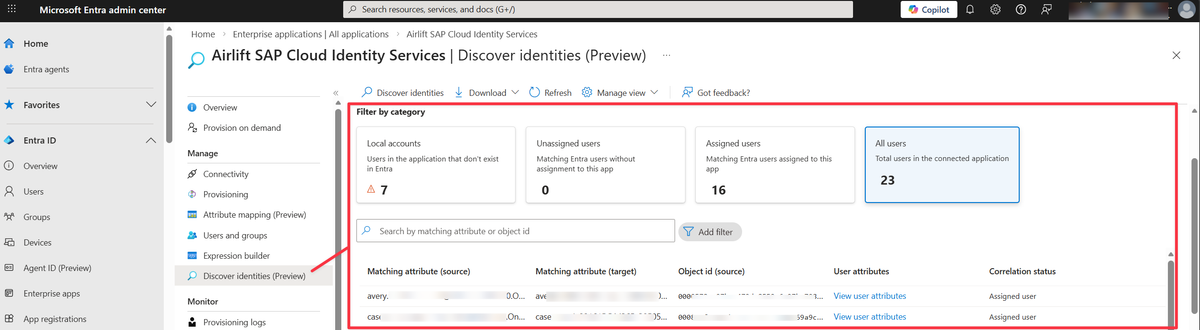
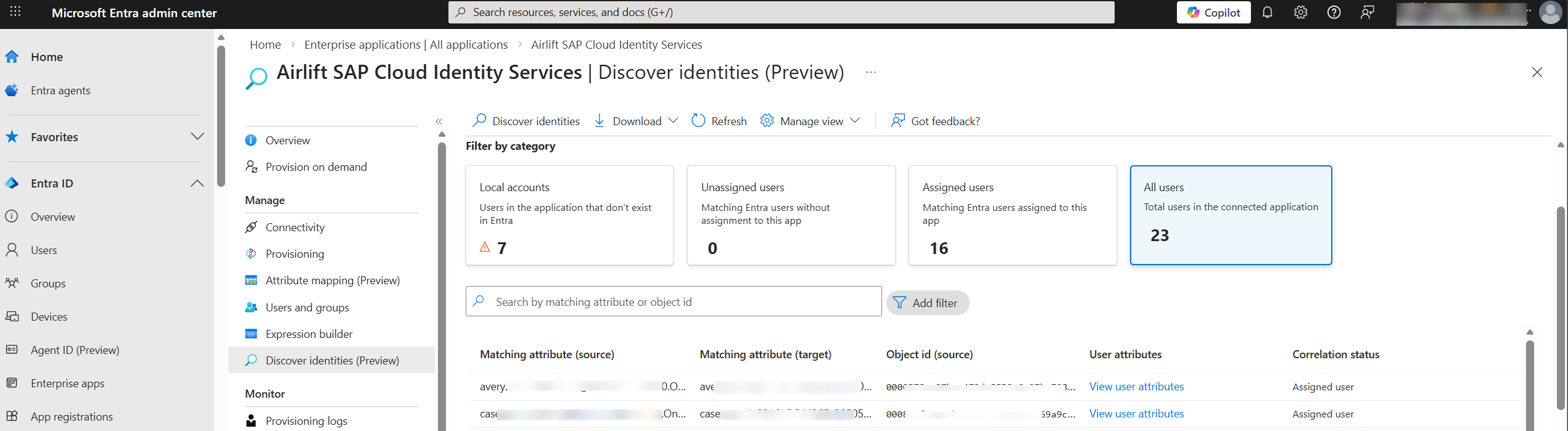
Account Discovery pulls all user objects from the target application through its SCIM endpoint and sorts them into three categories.
Local accounts
These are accounts that exist in the target application but have no matching user in Entra ID. They could be former employees whose directory accounts were removed but whose application accounts were never cleaned up, service accounts created directly in the application, or users that were provisioned through a different process entirely. You might also see accounts here that should have matched but did not, due to data quality issues like a mismatched email address or an outdated UPN. The typical action is to review each one and decide whether to remove it from the application, match it manually to an existing Entra ID user, or document it as a known exception.
Unassigned users
These are accounts that match an Entra ID user based on the matching attribute, but that user is not assigned to the enterprise application. The identity exists on both sides, but provisioning is not managing it. This usually happens when someone was given access to the application before provisioning was configured, or when they were removed from the application assignment in Entra ID but their account in the target app was not deprovisioned. The fix is to assign the user or the correct group to the enterprise application so provisioning can take over management on the next sync cycle.
Assigned users
These are accounts that match an Entra ID user who is already assigned to the application. This is the healthy state where provisioning is fully in control. No action is needed unless you want to review or update the attribute mappings for these users.
The matching between the target application account and the Entra ID user happens through the first direct matching attribute in your provisioning attribute mapping. This is usually something like userPrincipalName mapped to userName, or mail mapped to emails[type eq "work"].value, depending on the application.
Prerequisites
Before you can use Account Discovery, you need to have a few things in place. It is not available for every tenant or every application, and the licensing requirement means this is specifically aimed at organizations running Entra ID Governance.
You need of the following licenses to use this feature
- Microsoft Entra ID Governance
- Microsoft Entra Suite
You also need an enterprise application that is already configured for provisioning with valid admin credentials and a successful test connection. The provisioning configuration must include a direct matching attribute mapping between Entra ID and the target application. Expression-based matching is not supported for Account Discovery, which is important to know if you have complex transformations in your attribute mappings.
For role requirements, you need at least one of the following Entra ID roles:
- Application Administrator
- Cloud Application Administrator
- Hybrid Identity Administrator
Supported Applications
Account Discovery is currently in preview and has been opened up for most applications, with the exception of AWS, Workday, SuccessFactors, and Snowflake. For all other supported apps, customers can enable and use the feature today. Keep in mind that results will vary depending on whether the app supports the proper SCIM notation for listing users and pagination.
The key technical requirement on the application side is support for SCIM pagination as described in RFC 7644, Section 3.4.2.4. Account Discovery needs to retrieve all user accounts from the target application, and it does this by paginating through the SCIM /Users endpoint. If an application does not implement pagination correctly, the discovery process will not work.
This is worth keeping in mind if you are building or maintaining a custom SCIM endpoint. If you want Account Discovery to work with your application, your SCIM implementation must handle paginated GET requests on the /Users resource properly.
Running a Discovery
The process itself is straightforward...
- Navigate to the Enterprise Application in the Entra admin center
- Go to the Provisioning section
- Select "Discover identities." The provisioning service then connects to the target application and pulls all user accounts.
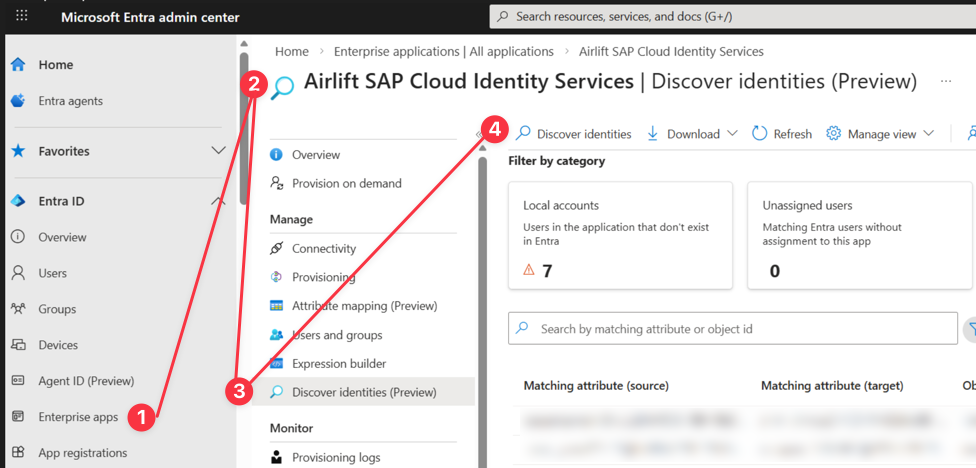
The report takes at least 30 minutes to generate even for small applications. For larger environments, it can take significantly longer. Microsoft documents that an application with around 250,000 accounts might take 12 hours or more to produce a complete discovery report. This makes sense when you consider that the service is paginating through every user object in the target application over SCIM, matching each one against the full Entra ID directory, and then building the categorized report.
Once the report is ready, you can search and filter the results by category, look at individual accounts, and see the imported attributes from the target application alongside the correlation status.
Known Limitations
Since this is a preview feature, there are some limitations that are good to know before you start relying on it.
The matching logic only uses a direct attribute mapping. If your provisioning configuration uses an expression to build the matching attribute (for example, combining givenName and surname into a displayName), Account Discovery will not be able to correlate accounts. It needs a straightforward one-to-one attribute mapping.
If you have multiple matching attributes configured in your provisioning setup, only the first one is used. This means that if your primary match is on userPrincipalName and your fallback match is on mail, Account Discovery will only try the userPrincipalName match. Accounts that would have matched on the second attribute will show up as local accounts instead of being correlated.
The supported application list is very limited at this point. If you are provisioning to applications like ServiceNow or Workday, you cannot use Account Discovery today. This is expected to expand as the feature moves toward general availability, but for now, plan your testing around the three validated applications.
Where It Fits in the Bigger Picture
Account Discovery is not just a reporting tool. It connects directly into the Entra ID Governance workflow. Once you have discovered and classified the accounts in your target applications, you can take action through the governance features.
For local accounts that should not exist, you can work with the application owner to remove them. For unassigned users, you can create access packages in Entitlement Management so that access to the application is properly governed going forward. You can run access reviews that cover not just the users you provisioned, but also the users you discovered. And you can set up lifecycle workflows so that new employees are automatically provisioned and departing employees are automatically deprovisioned, closing the loop that Account Discovery opened.
The real value here is visibility. Most organizations I work with have no idea how many accounts exist in their SaaS applications that are not tied to a current employee in the directory. Account Discovery gives you that number and tells you who those accounts belong to, or if they belong to anyone at all. That is a conversation worth having with your security team.
Wrapping Up
Account Discovery is a small but meaningful addition to the Entra ID Governance toolset. It solves a problem that has been around since organizations started using cloud applications, which is knowing what accounts exist in your applications and whether they are actually managed by your identity platform.
If you are already using SCIM provisioning with Entra ID, take a look at it. Run a discovery against one of your supported applications and see what comes back. You might be surprised by how many unmanaged accounts are sitting in applications that you thought were fully governed.
The feature is in preview, so expect changes. But the core concept of importing and classifying accounts from target applications is solid and fills a genuine gap in the provisioning workflow.